Whenever you install an application, an entry thereof is added in the Start Menu and place the end of the list while the other entries are arranged alphabetically.
To Automatically Sort Windows XP Start menu program list alphabetically:
1. Open the Registry Click on "start", "Run ..." then type "regedit" and click on "OK"
2. Go to the key: KEY_CURRENT_USER\Software\Microsoft\Windows\CurrentVersion\Explorer\MenuOrder
3. Pull down the key named "MenuOrder"
4. Delete the key named "Start Menu (Classic Start Menu) and /or" Start Menu2 "(XP style Start Menu)
5. Deleting this key will also eliminate its subkeys, but will have no impact.
Note: changes will apply after relogon
Showing posts with label Windows XP. Show all posts
Showing posts with label Windows XP. Show all posts
Thursday, July 14, 2011

Wednesday, April 27, 2011
How to: Hide a User from the Welcome Screen in Windows XP
To hide a user's account from the welcome screen in Windows XP:
1. Open Registry Editor.
2. In Registry Editor, navigate to the following registry key:
3. Create the following entry: Username: REG_DWORD
(Where Username is the username of the user you want to hide from the Welcome Screen).
4. Assign a value of 0.
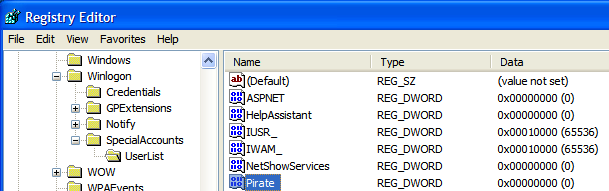
1. Open Registry Editor.
2. In Registry Editor, navigate to the following registry key:
3. Create the following entry: Username: REG_DWORD
(Where Username is the username of the user you want to hide from the Welcome Screen).
4. Assign a value of 0.
Saturday, April 16, 2011
How to: Disable Autoplay of Audio CDs and USB Drives
Why:
Almost of 'Autorun' Virus are infected your computer when you connected removable storage. So the best way to is to disable autoplay function, until you using a good a antivirus scanning or manually deleted autorun files.
How:
1. To get to the configuration screen for this setting, go to
Start Menu \ Run and type in: gpedit.msc
2. You will see the Group Policy window. You should select
Administrative Templates \ System in the tree view:

Almost of 'Autorun' Virus are infected your computer when you connected removable storage. So the best way to is to disable autoplay function, until you using a good a antivirus scanning or manually deleted autorun files.
How:
1. To get to the configuration screen for this setting, go to
Start Menu \ Run and type in: gpedit.msc
2. You will see the Group Policy window. You should select
Administrative Templates \ System in the tree view:
How to: Restore Missing Folders to the Group Policy Editor in Windows XP
When you open the Group Policy Editor in Windows XP Professional, some of the categories under Administrative Templates may be missing. For example when you expand Administrative Templates, the System category may be missing. This article provides information on how to restore the missing folders to the Group Policy Editor.

Subscribe to:
Posts (Atom)